
The remote control remains one of the most quietly important devices in the modern home. In 2026, voice assistants, smartphone apps, and smart-home hubs have changed how people interact with televisions, set-top boxes, and air conditioners, yet the humble plastic wand still rules the couch. It is simple, immediate, and deeply familiar. That is also why a malfunction feels so disruptive: the device has become a loyal companion, and when it suddenly throws a tantrum, the whole room notices.
Industry repair guides and user reports continue to show that most remote-control failures are not mysterious. They usually trace back to a short list of familiar culprits: age, batteries, signal interference, incorrect programming, software updates, or simple range and angle problems. The good news is that most of these issues can be solved at home. No rocket science required.
The usual suspects behind a stubborn remote
Remote controls have a useful life expectancy, just like any other electronic device. Older remotes are more likely to develop dead buttons or sluggish responses after years of use, misuse, or accidental damage. Inside the casing, the remote carries its own small network of components, much like a computer motherboard. Once part of that internal system is damaged, performance can suffer or stop altogether.
Battery trouble is the most common issue by far. Weak or dead batteries can impair performance, especially in frequently used remotes such as the television remote. Incorrect battery placement, leakage, and corrosion are also regular offenders. A remote may look perfectly fine on the outside while its power supply is quietly failing on the inside.
Signal problems are another frequent cause. Other devices can interfere with a remote’s infrared signal, and furniture can block the path between the remote and its target. Range matters as well: like Bluetooth devices, remotes must stay within a certain distance to communicate reliably. Users who point a remote from across the room may find that the device simply ignores the command.
Universal remotes add another layer. These controllers can operate multiple devices across brands, but they must be programmed with the correct code. A wrong code leaves the remote sending commands that the device does not understand. Similar-looking remotes can also create confusion in homes with several electronics from the same brand. Pointing the air-conditioner remote at the television is an easy mistake to make.
Software updates are increasingly relevant in 2026. Some brands, including Sony, release television software updates that also apply to the remote control. Failure to update both can affect how well the remote works. Households may receive an on-screen notification and can choose to update immediately or later.
| Symptom | Likely cause | First move |
|---|---|---|
| No response at all | Dead or misplaced batteries | Check placement and replace batteries |
| Some buttons fail | Dirt, wear, or internal damage | Clean the surface; test again |
| Works only up close | Weak signal or range issue | Move closer and clear obstructions |
| Controls the wrong device | Wrong code or similar remote | Reprogram or label remotes |
| Intermittent response | Interference or oxidation | Reset, clean contacts, adjust angle |
Fixes that cost little and work often
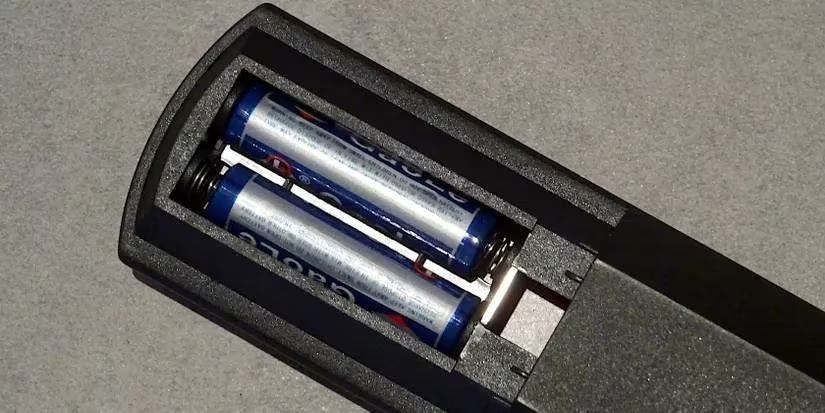
Battery checks should come first. Most remotes have a removable lid at the back and symbols inside the battery slot. Users should match the plus and minus marks exactly as shown. Batteries that are leaking or corroded should be replaced immediately. In many cases, that alone brings the remote back to life.
Cleaning is another simple step. Remote buttons rely on sensors, and dust or dirt can hinder them. A dry cloth is usually enough. Households should also keep multiple devices apart when one remote seems to control more than one product, or turn devices off when they are not in use. A direct line of sight and a short distance between remote and device improve reliability.
Angle matters more than many people expect. Depending on how a room is arranged, a remote may be pointed too high or too low. Changing the angle can restore communication. For universal remotes, reprogramming with the correct code from the user manual is the next step. If the setup process itself went wrong, a reset can help. Common reset methods include powering the remote off and on, removing the batteries, or long-pressing the power button. Brand-specific instructions vary, so users should follow the manufacturer’s guidance.
The slap trick: useful, but risky
Many households still swear by a quick slap to revive a remote. The habit has survived generations for practical reasons. Hitting the remote can shift batteries back into place, and the friction between battery and spring can remove a layer of oxidation that blocks low current flow. In those moments, the remote starts working again.
Still, whacking a remote is not a long-term repair strategy. It can crack the case, dislodge electronic components, or damage internal workings. Give it a gentle nudge—not a boxing match. If a remote has reached the end of its life after years of wear and tear, replacement is the sensible choice. Old television remotes can even be repurposed for other household tasks rather than discarded outright.
Preventive care remains the best defense. Regular battery changes, routine cleaning, and careful handling keep a remote responsive. In a 2026 home filled with smart devices, the remote control is still the most direct path from intention to action. Treat it well, and it will keep answering from the couch. It happens to the best of us—but a little maintenance goes a long way.