
It’s 2026, and I still find myself staring at that tiny, grayed-out “Sign Out” option with a padlock icon next to it, feeling like a prisoner in my own gaming chair. You know the drill: you want to switch accounts, maybe let your little brother try his new skin, or just escape from the clutches of a 10-game losing streak by pretending to be someone else—only to discover that Valorant has decided you’re not going anywhere. The sign-out button is locked, and a smug little message pops up: “Please close other Riot Games products before signing out.”
At first, I panicked. Had I accidentally opened League of Legends in another dimension? Was a Riot client secretly running a tea party in my system tray without an invitation? This bug behaves like a stubborn barnacle clinging to the hull of your PC—you barely notice it until you try to move, and then it stops you dead in the water. The truth is, the sign-out issue isn’t a hex from an enemy Yoru; it’s a quirk born from the tangled relationship between Valorant and the Riot Client.
Let’s unravel this digital knot. When you click that Valorant icon, you think you’re launching one game. In reality, you’re waking up a whole ecosystem: the Riot Client, a kind of centralized bouncer for all Riot titles, springs to life in the background. It’s like ordering a single coffee but getting the entire café wheeled over to your table—the espresso machine, the grinder, the barista, all of it. Valorant leans on this client for authentication and account management. So when you try to log out from inside the game, the client pipes up and says, “Hold on, pal, you still have me running!” Even if Valorant appears to be the only game you play, that Riot Client might still be lurking in the shadows, twiddling its digital thumbs.
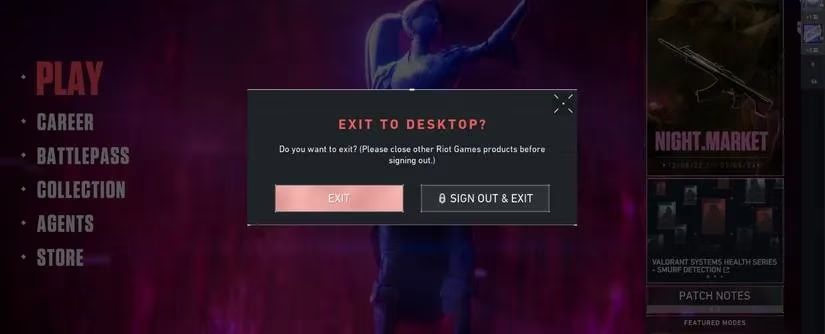
Sometimes, the culprit is a genuine second Riot game. Maybe your significant other fired up TFT on the same PC earlier and the process never properly clocked out. Other times, it’s a phantom—a bug where part of the Riot Client simply refuses to die after you close Valorant. It continues to haunt your task manager like a ghost that forgot how to move on to the afterlife. This has been a known gremlin since the launch of the unified client, and despite patches and updates, it still resurfaces every now and then, especially when Windows decides to be a bit too clingy with background processes.
So how did I finally unshackle myself? The solution is almost embarrassingly simple: stop banging your head against the in-game menu and go straight to the source. You don’t log out of Valorant; you log out of the Riot Client itself. Think of it as cutting the head off the hydra instead of trying to hack at all its necks.
Here’s the escape route I use every time now:
Step 1: Hunt down the Riot Client
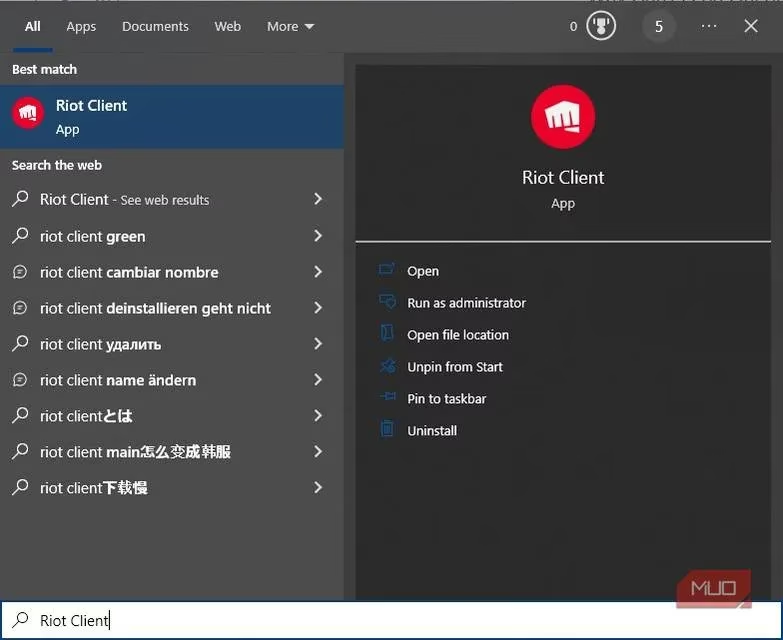
Hit the Windows key or tap Win+S and type “Riot Client.” Don’t fall for the “Valorant” suggestion—that’s the friendly decoy that keeps you trapped. Open the Riot Client directly.
Step 2: Find the silhouette of freedom
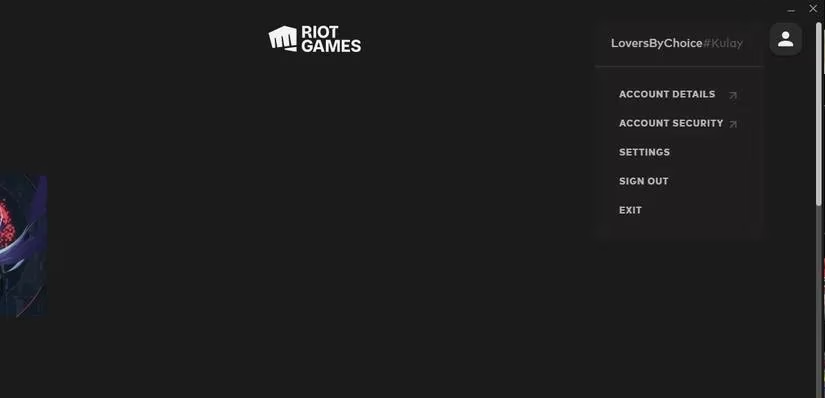
Once the client window appears, ignore any flashy game artwork. Look to the upper right corner—there’s a small square silhouette icon (it looks like a person who has mastered the art of not being locked). Click it, and a dropdown will reveal the glorious “Sign Out” button. No padlock, no gray box, just pure, unadulterated freedom.
Step 3: If the client itself is shy
Occasionally, even the Riot Client may not open or shows the same error. This is where the ghost processes come in. Press Ctrl+Shift+Esc to summon the Task Manager, and scrutinize the list for anything with “Riot” in its name—RiotClientServices.exe, VALORANT.exe even after the game is closed, or that sneaky League of Legends updater that never leaves. End those tasks with the fury of a thousand spike defusals. Then reopen the Riot Client and log out.
Step 4: The nuclear option
If everything else fails (which usually means Windows has woven these processes into its very soul), a simple restart acts like a cosmic reset button. The reboot scours away all stubborn background programs, giving you a clean slate. After logging back in, open the Riot Client before you touch Valorant, sign out, and then log in with the desired account.
What have I learned from this saga? Modern gaming clients have become far too clingy. They want to be our best friends, our libraries, our social networks, and our judges of inactivity. The Riot Client is like that overly enthusiastic friend who insists on holding your hand even after you’ve said goodbye at the doorstep. By learning to address the client directly, I’ve turned from a clueless victim into a savvy escape artist.
Next time that grayed-out padlock mocks you, don’t rage. Smile, whisper “I know your secret,” and gently close the Riot Client lid on its own chaos. Your accounts will thank you, and you’ll be back to climbing ranks—or smurfing responsibly—in no time.