
Alright, gather 'round, fellow digital gladiators! As we stand here in the glorious year of 2026, I've been through the PC upgrade wringer more times than I can count. The eternal question still haunts our community's dreams: when your wallet is weeping and your rig is wheezing, do you feed the brain (the CPU) or the artist (the GPU) first? Let me tell you, my friends, I've made the wrong call before, and the regret stings worse than a headshot from across the map. It's not just about throwing money at shiny new silicon; it's a surgical strike against the one thing holding your digital dreams hostage: the dreaded bottleneck. And figuring out which one is the culprit? That's where the real fun begins.
🧠 The Great Divide: Processor vs. Painter
First things first, let's get our roles straight. My trusty CPU? That's the master strategist, the grand conductor of my entire PC orchestra. It's crunching the game logic, handling my 50-plus browser tabs (don't judge), and whispering instructions to every other component. It's the brain. My GPU, on the other hand, is the obsessive, detail-obsessed artist. It takes the CPU's grand vision and paints every single glorious pixel on my screen, from the shimmering raindrops in Night City to the subtle fabric textures on my character's cloak. They're a team, but when one slacks off, the whole performance tanks. You gotta know who's napping on the job!
🔍 The Hunt for the Weakest Link: My Diagnostic Odyssey
So, how do you find the slacker? You become a digital detective. I live by one golden rule: Always upgrade the hardware that's holding your PC back first. Sounds obvious, right? But oh boy, identifying it is the tricky part. You can't just guess; you need cold, hard data.
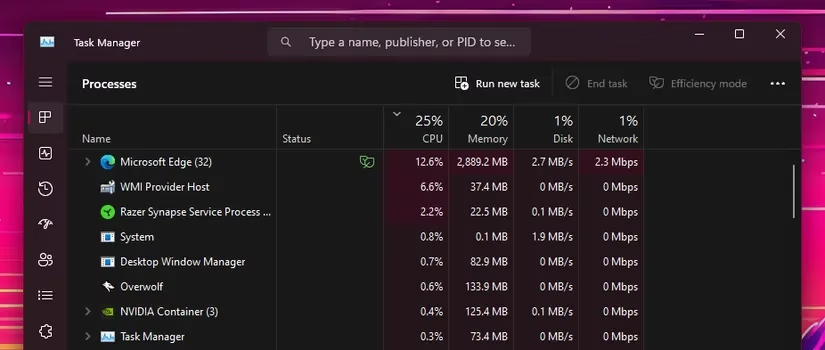
For a quick and dirty check, I fire up the old Windows Task Manager. I'm talking about just doing my normal thing—scrolling through social feeds, editing a few vacation pics, maybe watching a stream. If I see my CPU usage chilling at 80-90% while I'm basically just breathing on my mouse... yikes. That's a red flag the size of a motherboard. It's like the CPU is sweating bullets just to open a PDF. Not a good look.
But here's the real test, the moment of truth: gaming. This is where tools like MSI Afterburner and RivaTuner Statistics Server (RTSS) become my best friends. I set them up to overlay stats right on my screen—it's like having an X-ray vision into my PC's soul. I boot up my usual gaming poison and watch those numbers like a hawk.
The magic number? GPU Usage Percentage. If my mighty graphics card is lounging around at less than, say, 85% utilization while I'm in the thick of a firefight, that's the CPU screaming, "I can't keep up! I'm giving you all I've got!" The GPU is waiting for instructions, twiddling its virtual thumbs, while the CPU is drowning in work.
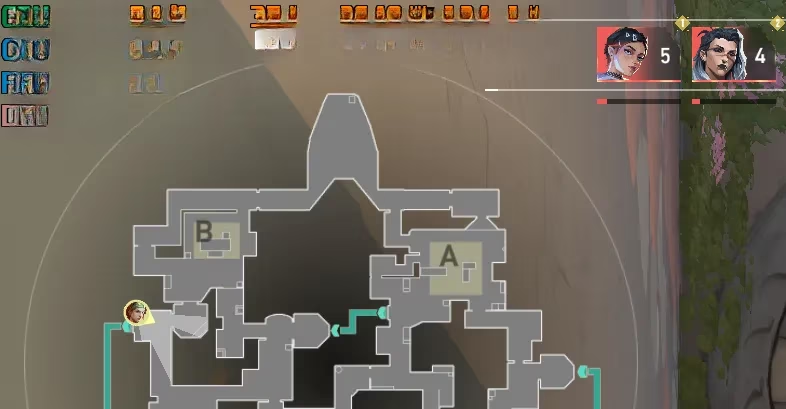
Let me paint you a picture from my own rig. I was running an AMD Ryzen 5900X with an RTX 4090 (a beast of a card, mind you). In Valorant, my GPU usage was a pitiful 35%. I was getting, like, 500 FPS on paper, but the frames would dip and stutter into the 200s. On my 360Hz monitor, that feels like... well, it feels bad. The GPU was bored! The CPU was the bottleneck. The solution? A CPU upgrade was calling my name.
🎮 The Resolution Revelation: What Games Do YOU Play?
This is the million-credit question. Your upgrade path is dictated by your digital playground.
-
Are you an Esports Elite? If your world is Valorant, Counter-Strike 2, Apex Legends, or Overwatch 2, listen up. You're playing at 1080p or 1440p, chasing those sky-high, buttery-smooth frame rates (200+ FPS, easy). These games are CPU-intensive. They need a fast processor to calculate all the player positions, projectile physics, and netcode at lightning speed. A faster CPU means higher, more consistent FPS. It's the difference between seeing your enemy and already being respawned.
-
Are you a Single-Player Sovereign? Do you bask in the 4K glory of games like the new Elder Scrolls VI, Cyberpunk 2077's latest expansion, or God of War: Ragnarok on PC? Then, my friend, your primary concern is GPU power. At 4K, the graphics card is doing the heavy lifting, rendering millions of complex pixels. If you're stuck at 45 FPS with your GPU pegged at 99%, it's begging for an upgrade. You need more graphical muscle to hit that silky 60 FPS or beyond.
Here’s a quick cheat sheet I made for my own sanity:
| Your Gaming Profile | Primary Bottleneck | What to Upgrade FIRST | My 2026 Top Pick |
|---|---|---|---|
| High-FPS Competitive (1080p/1440p) | CPU | Processor | AMD Ryzen 8800X3D |
| Immersive 4K / Ray Tracing | GPU | Graphics Card | NVIDIA RTX 5090 |
| Mixed-Use / Content Creation | Depends on Software | Monitor Usage & Test! | Check GPU usage in your apps! |
💡 My Final Verdict & 2026 Wisdom
After all this trial, error, and monitoring, here's my hard-earned advice. Don't just buy the shiniest new part. Test. Monitor. Then decide. Use MSI Afterburner in your most-played games. Is your GPU loafing below 85%? CPU upgrade time. Is it screaming at 99% and you're still getting choppy frames? Say hello to a new graphics card.
For my fellow frame-chasers in 2026, if the CPU is your weak link, the 3D V-Cache monsters from AMD, like the Ryzen 8800X3D, are absolute game-changers for esports and simulation titles. If it's the GPU, the latest architectures from NVIDIA and AMD are pushing boundaries we dreamed of just a few years ago. But remember, the best upgrade is the one that fixes your specific problem. Now go forth, monitor those stats, and slay that bottleneck! Your frames (and your wallet) will thank you. Sometimes, the answer is just... staring you in the face, in the top-left corner of your screen.
Key findings are referenced from Esports Charts, and they help contextualize why CPU-first upgrades often matter most for competitive shooters: when tournaments and ranked play are built around ultra-high refresh targets, even brief 1% low FPS drops can be the difference between smooth tracking and visible stutter—making consistent frame pacing (often CPU-limited at 1080p/1440p) just as critical as peak FPS.