
Yo, gamers! Is your Steam acting up and telling you the "Friends Network is Unreachable" right when you're about to squad up with the boys? So annoying, right? You're staring at that broken connection icon, your friends are already in the lobby, and you're just... stuck. Don't worry, you're not alone, and this isn't a new problem—it's been bugging players for years, even up to 2026. But guess what? I've been through this mess myself and dug up all the working fixes from the trenches. Let's get you back online and fragging with your crew! 🎮
First things first—did you try turning it off and on again? I know, I know, it's the classic IT joke, but seriously, a simple restart can work wonders for those random Steam glitches. Before you dive into the deep end, give this a shot:
-
Close Steam completely. Don't just minimize it.
-
Open your Task Manager (Ctrl+Shift+Esc).
-
Look for any Steam processes still running in the background and End Task on all of them.
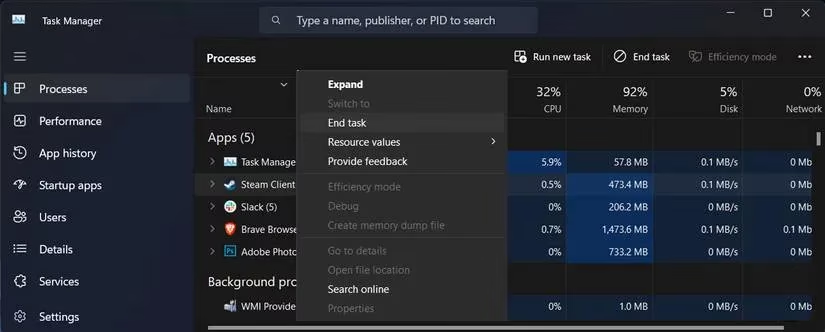
- Relaunch Steam and see if your friends list magically reappears. If it did, easy win! If not, we move on to the next step.
Alright, so a restart didn't cut it. The next culprit is often hiding right in your settings. Sometimes, the option to sign into friends chat can get mysteriously turned off. Let's check that:
-
Open Steam and go to Steam > Settings.
-
Click on Friends & Chat in the left menu.
-
Make absolutely sure the toggle for "Sign in to friends when Steam Client starts" is ON.
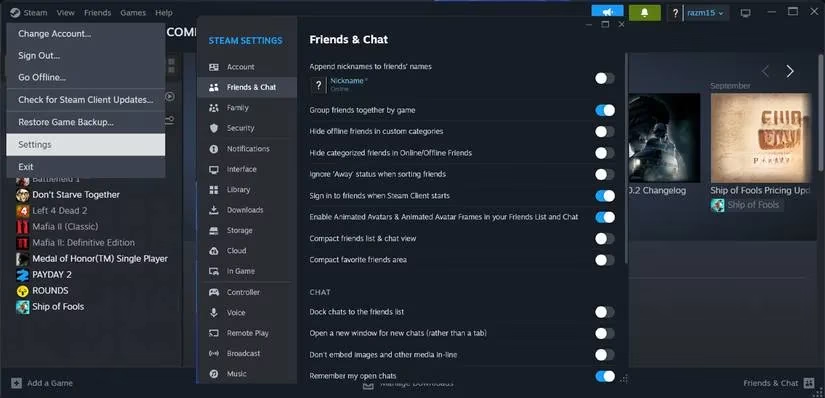
- Restart Steam again. This simple toggle has saved more gaming sessions than you'd think!
Are you a beta tester? Using the Steam Beta Client can give you cool new features early, but it can also introduce instability and bugs—like our pesky network error. If you're on the beta, maybe it's time to switch back to the stable release.
-
Go to Steam > Settings > Interface.
-
Find the drop-down for "Client Beta Participation".
-
Select "No beta chosen" from the list.
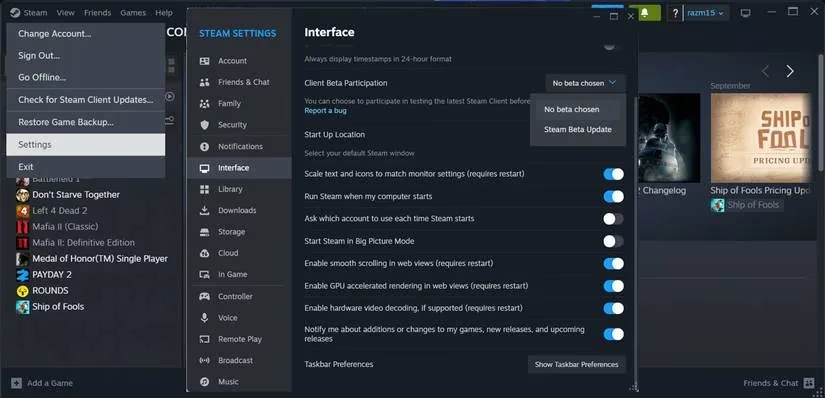
- Steam will update and restart. This often resolves weird connectivity issues caused by experimental builds.
Now we're getting into the more technical fixes. This one involves a sneaky little command-line tweak. It's like giving Steam a secret handshake to bypass the friends UI bug.
-
Find your Steam shortcut (on your desktop or in the Start menu).
-
Right-click it and go to Properties.
-
In the Target field, at the very end of the path, add a space and then type:
-nofriendsui- It should look something like:
"C:\Program Files (x86)\Steam\steam.exe" -nofriendsui
- It should look something like:
-
Click Apply and OK, then launch Steam using this modified shortcut. This disables the new friends interface and might just be the key!
Corrupted cache data is a classic villain for all sorts of software problems, and Steam is no exception. Think of it as clearing your Steam's browser cookies. Here's how to nuke that bad data:
Method 1: The AppData Folder
-
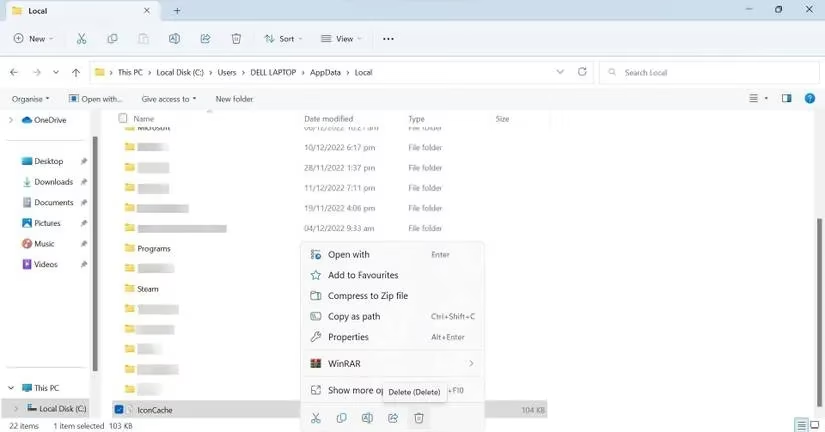
Press Win + R, type
%appdata%, and hit Enter. -
In the folder that opens, find and delete the Steam folder.
-
Warning: This will reset some local settings, but your games and saves are safe in a different location.
Method 2: The In-Game Browser Cache
Steam has its own built-in web browser for the overlay, and that cache can also go bad.
-
Launch any game from your Steam library.
-
Once in-game, press Shift + Tab to bring up the Steam Overlay.
-
Click the little Settings gear icon (usually at the bottom).
-
Go to the In-Game settings tab.
-
Find and click the button that says "Delete Web Browser Data".
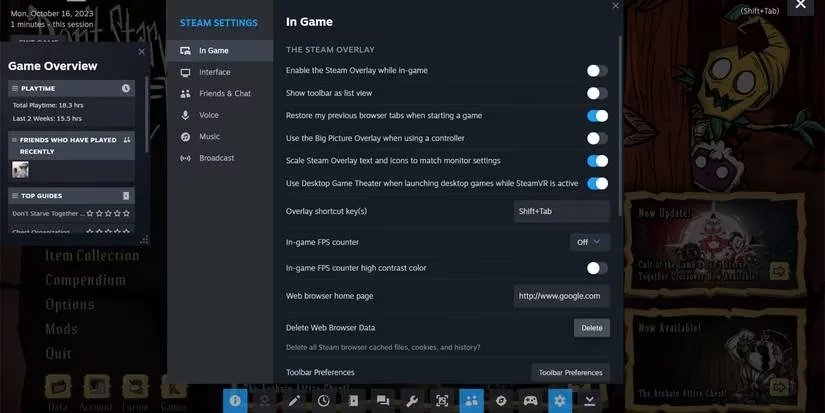
- Confirm, close the game, and restart Steam. This is a more targeted cache clear and works surprisingly often!
Okay, so you've tried everything and that error is still laughing in your face. What now? Don't despair! While you work on a permanent fix, Steam has an awesome backup plan: Remote Play Together. This feature is a lifesaver. It lets you join your friend's game session over the internet as if you were sitting on their couch. The best part? You don't even need to own or have the game installed! Your friend streams it directly to you. It's not a fix for the friends list, but it's a brilliant workaround to keep the gaming night alive. Just have your friend invite you via the Steam overlay while they're in a supported game.
| Fix Number | Method | When to Try It |
|---|---|---|
| 1 | Restart Steam & Kill Tasks | First step, always. Solves temporary glitches. |
| 2 | Check Friends & Chat Settings | Quick and easy, a common oversight. |
| 3 | Leave Steam Beta | If you're on an unstable beta build. |
| 4 | Use -nofriendsui Launch Option | A technical fix for a stubborn UI bug. |
| 5 | Clear Cache (AppData & Browser) | The nuclear option for corrupted data. |
| 6 | Use Remote Play Together | The ultimate workaround while troubleshooting. |
So, there you have it, squad! The "Steam friends network unreachable" error can be a real mood killer, but it's almost always fixable. Start with the simple stuff (restart, check settings) and work your way down the list. One of these solutions has got to work for you. Remember, in 2026, we have more tools and community knowledge than ever to tackle these issues. Now get out there, fix your Steam, and get back to the game! What was the fix that finally worked for you? Let me know in the comments! 👇 GG & GLHF!