
Hey Pi enthusiasts! 👋 Remember back in 2024 when the Raspberry Pi Foundation dropped the M.2 HAT+ for the Pi 5? Fast forward to 2026, and this little $12 accessory has become an absolute game-changer for my projects. I finally got my hands on one, and let me tell you, it completely transforms what the Pi 5 can do. Gone are the days of sluggish microSD cards and USB-bottlenecked SSDs. The future of Pi storage is here, and it's screaming fast! 🔥
Why the M.2 HAT+ is a Must-Have Upgrade
Let's be real, what were the old storage options?
-
MicroSD Cards: Slow (like 100 MB/s read) and prone to corruption. 😬
-
USB SATA SSDs: Better, but they hog a precious USB 3.0 port and are capped at around 300 MB/s.
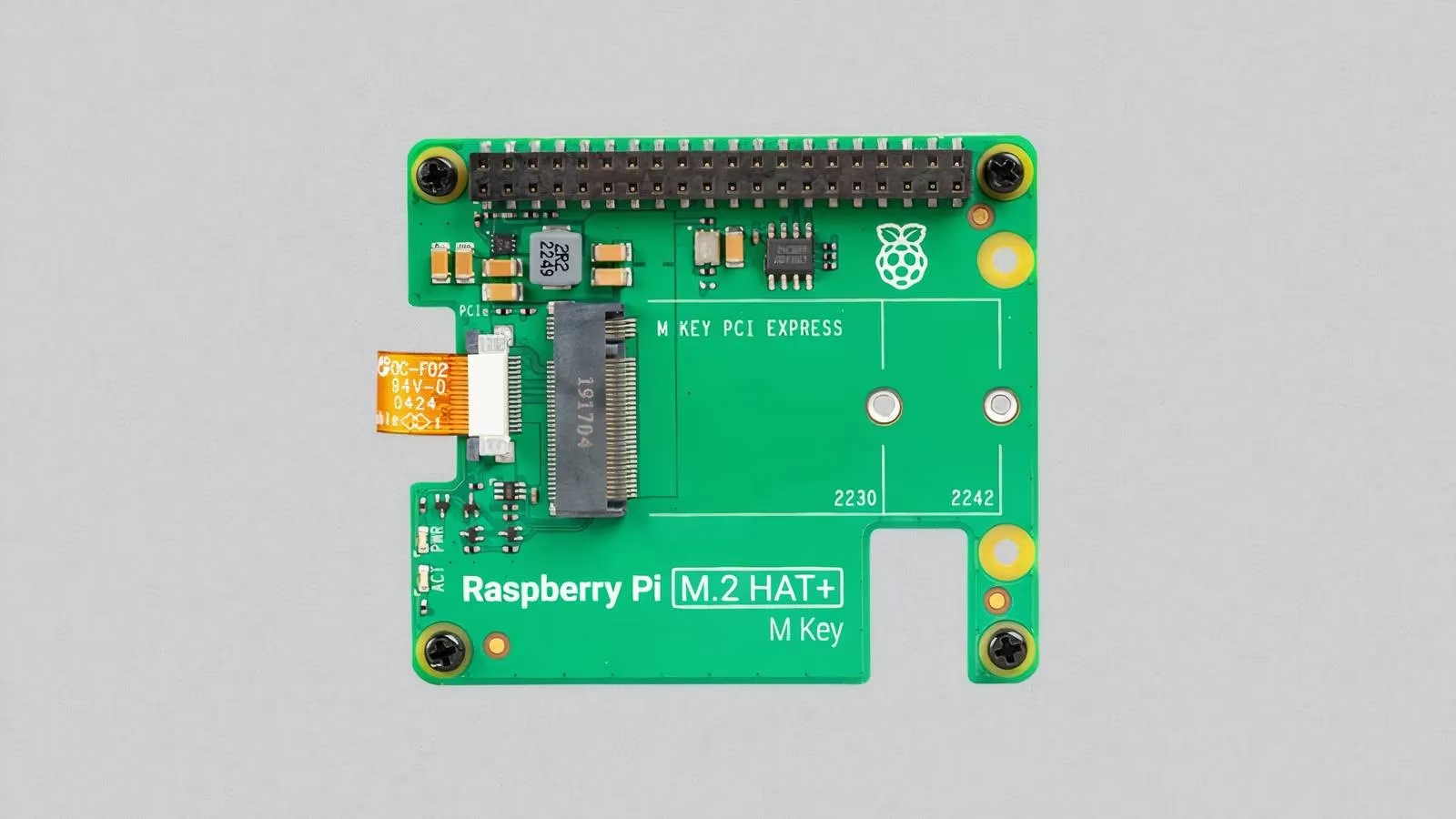
So, what's the solution? Enter the M.2 HAT+! This 'Hardware Attached on Top Plus' board is the official, supercharged way to connect NVMe SSDs directly to the Pi 5's PCIe bus. No more USB bottlenecks!
Unboxing & Setup: Simpler Than You Think!
The kit comes with the HAT+ board and a flexible flat cable (FFC). No separate power needed—it draws everything through the cable from the Pi! 🤯 But a pro tip: USE THE OFFICIAL 27W POWER SUPPLY. The HAT+ can deliver up to 3A to your SSD, and you don't want power issues.
The connection is a breeze:
-
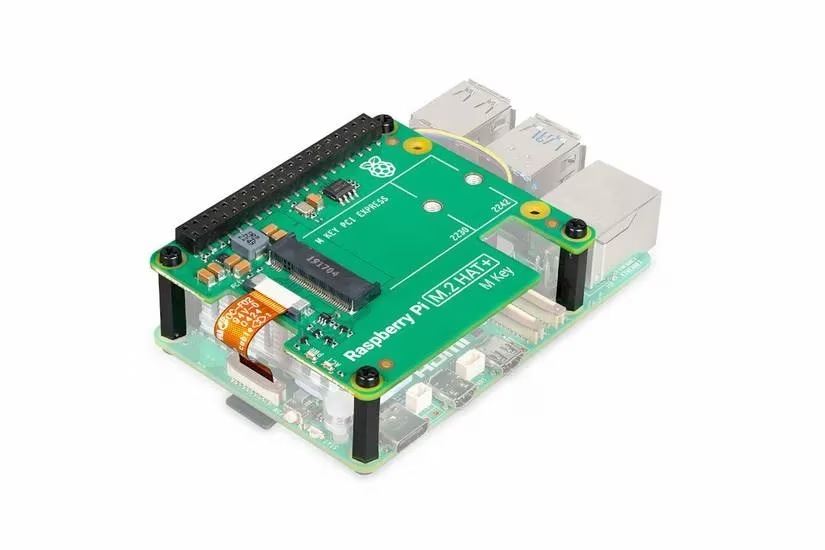
Plug one end of the FFC into the Pi 5's PCIe connector.
-
Connect the other end to the HAT+.
-
Mount it over the Pi using the included 16mm standoffs.
Compatibility Check: You need an NVMe SSD (M-key). M.2 SATA drives won't work! For size, 2230 or 2242 form factors fit perfectly. Longer drives are compatible electrically but will hang off the board.
The Speed Test: How Fast Can We Go? 🏎️💨
Here's where it gets exciting. Out of the box, with the default PCIe 2.0 setting, I was getting solid reads over 400 MB/s. That's already 4x faster than a good microSD card! But why stop there?
The Pi 5's PCIe bus can be tweaked. By enabling PCIe Gen 3 mode, you can unlock insane speeds. Here's how:
-
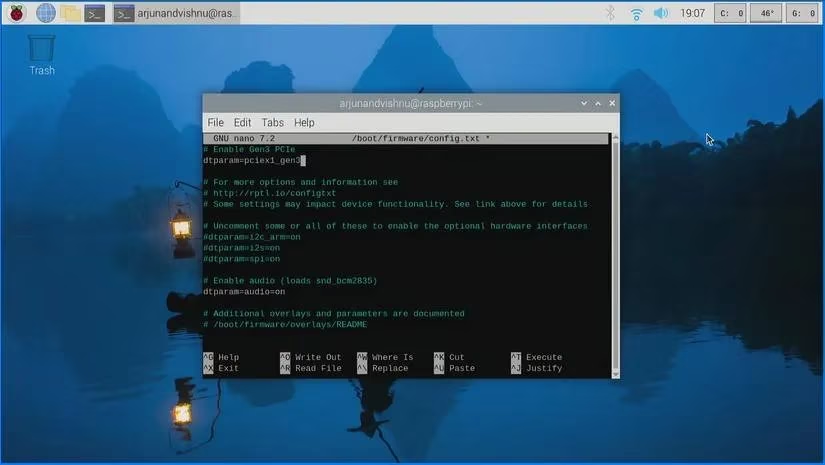
Open the terminal and edit the config file:
```bash
sudo nano /boot/firmware/config.txt
```
-
Add this single line:
```
dtparam=pciex1_gen3
```
-
Save (Ctrl+O) and reboot.
⚠️ A quick note: Gen 3 isn't officially supported yet (as of my testing in 2026, it's still considered experimental). But the performance boost is undeniable! After the change, my benchmarks consistently showed speeds in excess of 800 MB/s! That's more than double the default speed. Can you imagine running a media server or a database off this? It's a whole new world.
| Storage Method | Approximate Read Speed | Notes |
|---|---|---|
| MicroSD Card (UHS-I) | ~100 MB/s | Slow, unreliable |
| USB 3.0 SATA SSD | ~300 MB/s | Uses a USB port |
| M.2 HAT+ (PCIe 2.0) | >400 MB/s | Default, stable |
| M.2 HAT+ (PCIe 3.0) | >800 MB/s | Experimental, but blazing fast! |
OS Installation: The Slight Hurdle (& Easy Fix)
You might ask, "But how do I install the OS on the NVMe drive?" Great question! You can't boot the Pi 5 installer directly from an NVMe. The easy workaround is this:
-
Start Small: First, install Raspberry Pi OS to a microSD card as usual and boot from it.
-
Clone to Speed: Once booted, open the Raspberry Pi Imager tool.
-
Choose Your Target: Select your OS and, crucially, choose the NVMe drive as the destination storage.
-
Swap and Go: After it finishes, power down, remove the microSD card, and reboot. Your Pi 5 will now boot from the super-fast NVMe! 🎉 No need for a special USB-to-M.2 adapter.
The Not-So-Perfect Bits: Thermal & Design Considerations
Is it all sunshine and rainbows? Almost, but there are two things to watch out for:
-
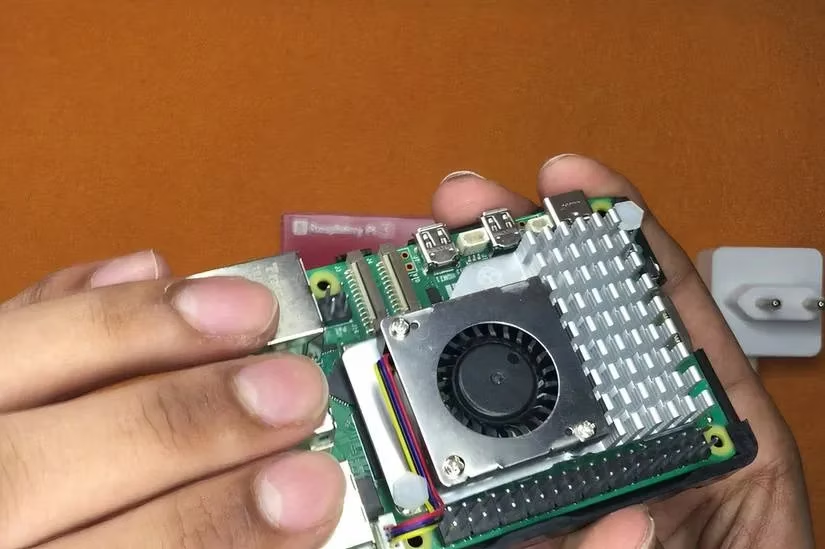
Cooling is CRUCIAL: The Pi 5's processor is powerful and gets hot. The official cooler is designed to fit under the HAT+. Third-party tall heatsinks might not fit due to clearance issues.
-
Without proper cooling, your Pi will throttle in under a minute under load.
-
The tight space can also slightly impact airflow and make the fan a bit noisier at full speed.
-
- Third-Party Alternatives: The delayed launch of the official HAT+ led to cool third-party options like Pimoroni's NVMe Base. They're great, but the official HAT+ sets a future-proofed standard.
Final Verdict: Should You Buy It in 2026?
Absolutely, 100% YES! 🙌
Think about it:
-
Cost: Only $12 for the board. It's a no-brainer.
-
Performance: Unlocks the fastest possible storage for the Pi 5, pushing past 800 MB/s.
-
Future-Proof: The HAT+ standard is here to stay for peripherals beyond storage, like AI accelerators.
The Raspberry Pi 5 has a beastly processor. Why hold it back with slow storage? The M.2 HAT+ ensures your Pi isn't waiting around for data. Whether you're into home automation, retro gaming, or lightweight server tasks, this upgrade makes everything snappier and more reliable. So, what are you waiting for? Get that HAT+ and unleash your Pi's full potential! 💻✨