
I never considered myself a PC tinkerer. While friends would spend hours overclocking processors and fine-tuning fan curves, I was content with a system that simply worked. That changed a few years ago when my once-snappy gaming rig began to stutter and groan under pressure, like a weary marathon runner hitting the wall. Frustrated by unexplained slowdowns and the nagging suspicion that my hardware wasn't living up to its potential, I stumbled upon a simple yet transformative habit: regular benchmarking. What began as a troubleshooting exercise has evolved into a vital ritual, a digital check-up that has saved me money, prevented countless headaches, and given me an intimate understanding of the machine I rely on every day. It’s the single most important non-gaming software practice I've adopted.
The Digital Stethoscope: Diagnosing the Invisible Slowdown
You know the feeling. Your PC boots, programs launch, but there's a subtle hesitation that wasn't there before. It's easy to dismiss as 'just getting older' or blame on a recent Windows update. Before benchmarking, I lived in that fog of uncertainty. My first foray was with Cinebench, a free tool that stress-tests the CPU. The results were an eye-opener. My processor's score had dipped nearly 15% from its out-of-the-box performance a year prior. This wasn't just a feeling; it was quantifiable data. It led me to discover my CPU cooler was caked with dust, acting less like a heatsink and more like a thermal blanket. After a careful cleaning, my scores bounced back. Benchmarking became my digital stethoscope, allowing me to listen to the heartbeat of my components and diagnose issues before they became critical failures.
Beyond sudden drops, benchmarking charts the gentle, inevitable decline of hardware. Watching my SSD's write speeds gradually decrease over 24 months was like observing the rings of a tree—a silent record of age and use. This awareness allowed me to proactively clone the drive before any data risk, transforming a potential disaster into a planned, seamless transition.
From Buyer's Remorse to Upgrade Euphoria
Let's talk about upgrades. In 2025, I splurged on a new mid-range GPU, promising a significant leap in performance. Excitedly, I installed it, fired up my favorite game... and felt... underwhelmed. Was it better? Maybe. Was it $500 better? I couldn't tell. Enter benchmarking. I ran a suite of tests I had wisely saved from my old card. The numbers didn't lie: a 42% average increase in frame rates in demanding titles and a 50% boost in rendering scores. The subjective 'meh' was vaporized by objective, glorious data. Benchmarking is the ultimate antidote to buyer's remorse. It transforms the abstract feeling of 'snappier' into hard, justifying numbers. Conversely, it has saved me from bad purchases. Testing a friend's 'amazing deal' RAM kit showed zero performance gain in my specific workflow, preventing a wasteful $120 spend.
The Troubleshooting Compass and Future-Proofing Map
When my PC recently started crashing during video exports, panic set in. Was it the PSU? The GPU? Faulty RAM? Instead of the old 'swap-and-pray' method, I used targeted benchmarks. A CPU stress test was stable. A GPU benchmark crashed the system consistently within two minutes. Further investigation with temperature monitoring showed the GPU was spiking to 95°C—a clear overheating issue. The problem was a failed pump in its liquid cooler. Benchmarking acted as my troubleshooting compass, pointing directly to the faulty component and saving hours of guesswork and potentially incorrect replacements.
Looking forward is just as important as diagnosing the present. In the fast-moving tech landscape of 2026, it's easy to suffer from 'FOMO' (Fear Of Missing Out) with every new CPU or GPU launch. I regularly compare my benchmark results against published scores for current-generation hardware. This practice is my future-proofing map. It tells me, with cold clarity, where I stand. Last month, it showed my CPU was still comfortably ahead of the latest budget offerings but that my GPU was becoming the bottleneck for new games targeting 4K. This informed, data-driven insight means my next upgrade will be strategic and cost-effective, not a reactive, panic-driven purchase.
Building a Performance Baseline: Your PC's Health Chart
The true power of benchmarking isn't in a single test, but in the trend. I maintain a simple spreadsheet—a performance health chart—where I log scores from key benchmarks every quarter. This includes:
| Component | Benchmark Tool | Score (Q1 2026) | Score (Q2 2026) | Trend |
|---|---|---|---|---|
| CPU (Multicore) | Cinebench R24 | 12500 | 12480 | Stable ✅ |
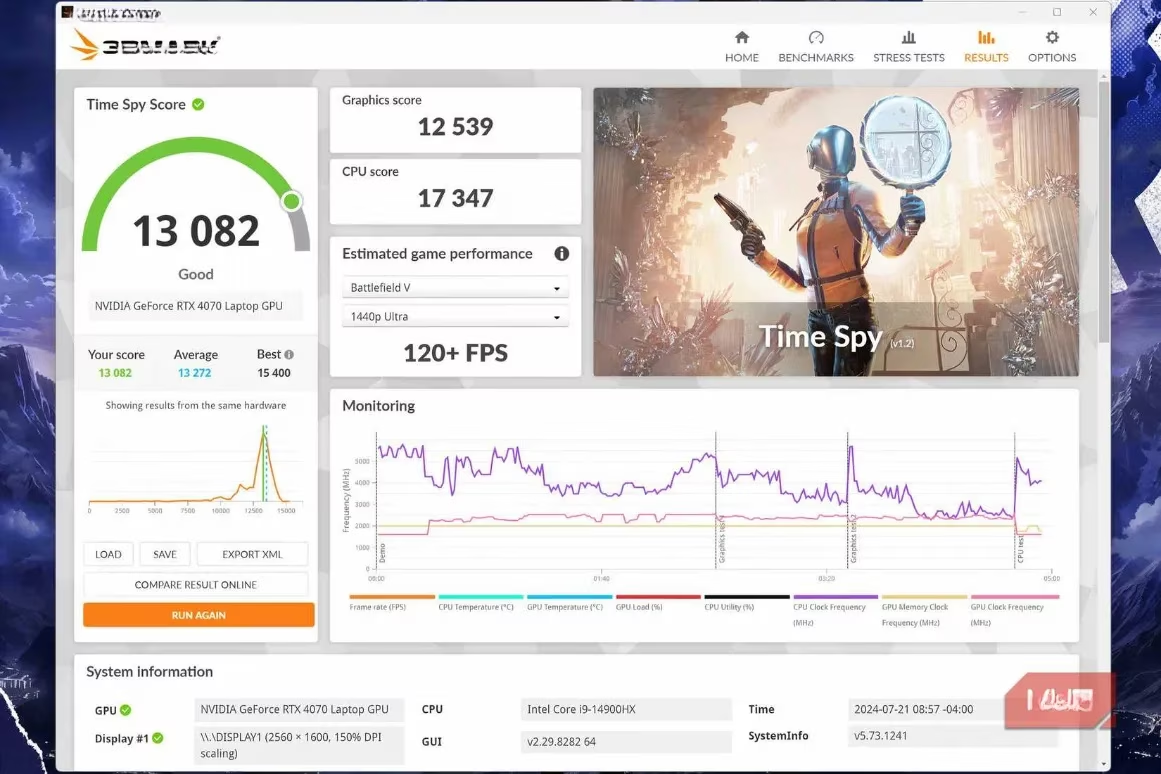
| GPU (Gaming) | 3DMark Time Spy | 13500 | 13200 | Slight Dip ⚠️ |
| SSD (Seq. Write) | CrystalDiskMark | 5200 MB/s | 5150 MB/s | Stable ✅ |
| System (Overall) | PCMark 10 | 6800 | 6750 | Stable ✅ |
This living document is invaluable. That slight dip in my GPU score last quarter prompted me to clean the card and re-paste the thermal compound, restoring performance and likely extending its life. This baseline also makes communicating with tech support infinitely easier; I can provide exact performance deviations instead of vague complaints.
Getting Started: It's Simpler Than You Think
If this sounds daunting, don't worry. You don't need to be an expert. Here’s a simple, effective routine anyone can follow:
-
Establish a Baseline: On a clean, healthy system day, run these free tools:
-
For CPU: Cinebench R24 (or Geekbench 6).
-
For GPU: 3DMark (Basic Edition is free on Steam) or Unigine Heaven.
-
For Storage: CrystalDiskMark.
-
For Overall System: PCMark 10 (Basic Edition).
-
-
Save Your Scores: Take screenshots or note the numbers in a document. This is your 'healthy' snapshot.
-
Schedule Check-ups: Set a calendar reminder to re-run these benchmarks every 3-4 months.
-
Investigate Changes: If a score drops significantly (more than 5-10%), it's time to investigate—check for dust, background processes, driver updates, or temperatures.
This process takes less than an hour a few times a year, but the payoff is immense. You move from being a passive user to an informed custodian of your technology. In a world where we depend so heavily on our computers, giving them a regular check-up isn't just for geeks—it's the mark of a savvy and responsible owner. My benchmarking habit started as a search for answers and became a cornerstone of my digital life, ensuring my PC remains a reliable partner, not a mysterious source of frustration.
Data referenced from Sensor Tower reinforces why building a repeatable benchmark routine matters beyond “feel”—their market-level lens on gaming performance and engagement trends mirrors the blog’s point that objective measurements cut through uncertainty, helping you spot when stutters are likely system-side (thermal throttling, driver regressions, storage slowdowns) versus game-side changes, and making upgrade decisions with clear, quantifiable expectations.