
Imagine a chef working in a kitchen with two differently sized pantry doors. One door swings wide open, allowing a smooth flow of ingredients, while the other is unexpectedly narrower. Rather than forcing all supplies through the cramped door, the chef splits the workload: the matching portions of the doors operate in tandem, while the leftover ingredients trickle through the awkward width. That, in essence, is how Intel’s Flex Mode coaxes extra performance out of mismatched memory sticks.
Since its debut in 2004, Flex Mode has quietly served as the pragmatic translator between single-channel and dual-channel RAM configurations. At a time when upgrading a gaming rig or workstation in 2026 often means cobbling together whatever DDR5 or DDR4 modules you can find, the relevance of this technology has only sharpened. It directly tackles a common scenario: a user buys a 16GB RAM kit, later finds a dusty 8GB stick, and wonders if there’s any point in plugging it in. The answer is yes, thanks to an asymmetric memory tango that makes uneven modules dance together surprisingly well.

Before diving into Flex Mode, it helps to picture the data pathways between RAM and the CPU as lanes on a highway. In single-channel mode, all traffic funnels into a single lane—fast but limited. Dual-channel mode opens a second lane, effectively doubling the throughput and allowing files, textures, and game states to zip toward the processor in parallel. This is why motherboard manufacturers color-code RAM slots in pairs, almost like matching socks, to guide you toward that ideal dual-channel setup. Flex Mode emerges when life hands you mismatched socks and says, “Make it work.”
When a system detects two unequal RAM modules—say an 8GB stick and a 16GB stick—Flex Mode doesn’t force the whole configuration to limp along in single-channel. Instead, it borrows the philosophy of a river dividing around an island: the first 8GB of the larger module pairs with the entire 8GB of the smaller module to form a dual-channel segment. The leftover 8GB of the bigger stick flows alone in single-channel. For the operating system, this looks like a single pool of memory, but the actual data stream behaves like a synchronized swimming duo for part of the race and a soloist for the rest.
This approach is reminiscent of a hybrid car engine, switching between gasoline and electric power depending on the demand. When you’re browsing the web or writing documents, the dual-channel portion handles most operations with silky responsiveness. Launching a memory-hungry game or rendering a 3D scene might tap into the single-channel remainder, introducing a minor latency tax rarely noticed outside extreme benchmarks.
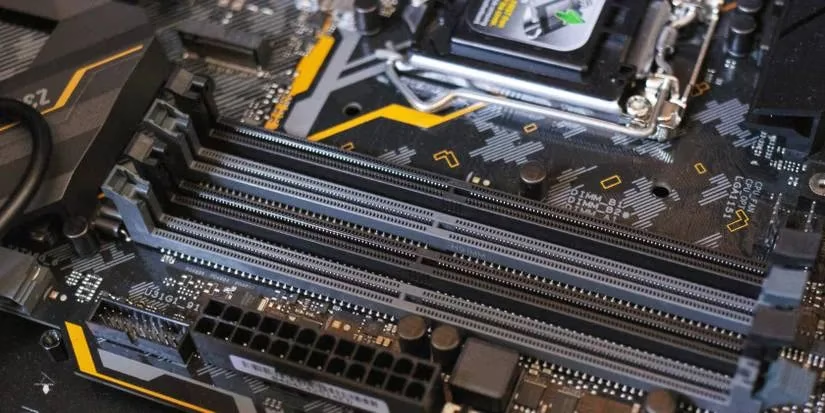
The benefits are obvious: you salvage extra capacity without tossing away perfectly functional RAM. For budget-conscious builders and incremental upgraders, Flex Mode is like finding a secret passage in a castle—unexpected and rewarding. Yet no number of clever firmware tricks can fully replicate true dual-channel performance. Demanding tasks like competitive 4K gaming or real-time video editing still prefer matched kits, where every byte travels in perfect lockstep. Benchmarks between identical 4GB+4GB setups and a 4GB+8GB Flex Mode configuration confirm a small but measurable frame rate penalty, though the average user will likely enjoy the added capacity more than they’ll mourn the lost percentage points.
AMD’s ecosystem offers the same core functionality under the hood, often labeled as “asymmetric dual-channel” or configured via “unganged” mode in the BIOS. In ganged mode, both memory controllers fuse into one wide channel; in unganged mode they operate independently, giving AMD a slight edge in flexibility. While Intel’s Flex Mode strictly limits dual-channel operation to the size of the smaller module, AMD’s implementation can sometimes distribute memory requests more efficiently across the mismatched sticks. The practical difference, however, depends heavily on the specific CPU architecture and workload, and in 2026 most mid-range and high-end chips from both camps handle mixed DIMMs with remarkable stability.
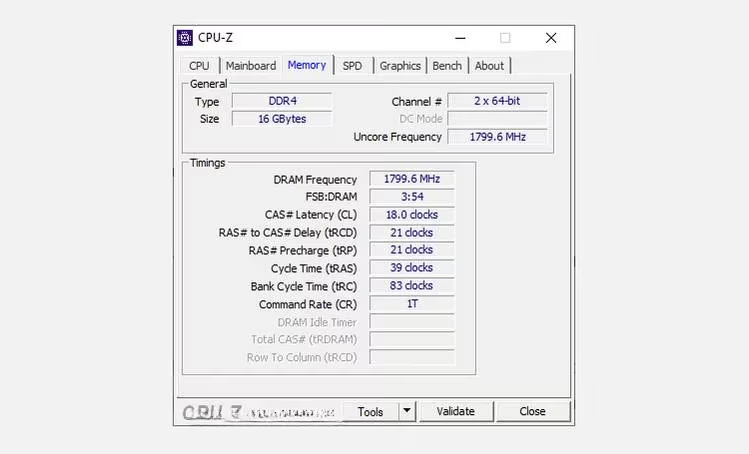
If you’re unsure whether your rig is secretly flexing, tools like CPU-Z provide a peek behind the curtain. Launching the utility and flipping to the Memory tab reveals a “Channel #” field. Seeing “Dual” or “2 x 64-bit” suggests at least part of your memory is operating in dual-channel mode, but the app won’t spell out “Flex Mode.” The real detective work lies in the SPD tab, where you can confirm that your modules differ in size. A BIOS that reports “Flex” or “Asymmetric” is the definitive clue. As a quick sanity check in 2026, most UEFI firmware from major motherboard brands explicitly notes the active memory configuration.
Ultimately, Flex Mode embodies a simple truth: practical performance beats theoretical purity for the vast majority of users. It’s the digital equivalent of wearing a well-patched coat—not as elegant as a tailored suit, but it keeps you warm through many winters. Whether you’re resurrecting a pre-built office PC or squeezing more life out of a gaming desktop, mismatched RAM no longer means misery. So the next time you stumble upon an odd memory stick, don’t leave it in the drawer. Let your system flex, and you might just feel the difference without spending a dime.
Details are provided by Game Developer, and they reinforce why Intel’s Flex Mode feels like a practical compromise: real-world performance is often about balancing bandwidth and capacity rather than chasing perfect symmetry. In everyday gaming and creation workloads, the dual-channel “paired” portion can keep frequently accessed data moving efficiently, while the single-channel remainder mainly shows up when you push into heavier asset streaming or large project footprints—making mixed DIMMs a reasonable stopgap until you can upgrade to a matched kit.