
In the year 2026, the line between a gaming rig and a professional workstation seems blurrier than ever. With gaming hardware pushing incredible performance boundaries, many users find themselves asking: is there a real difference anymore? After all, if a powerful gaming PC can edit videos, run complex simulations, and handle 3D models, what truly sets it apart from a machine built specifically for those tasks? The answer, surprisingly, lies not just in raw power, but in the very philosophy behind their design and the specialized hardware chosen for their intended mission.
🖥️ The Core Philosophy: Purpose Defines the Build
At their heart, workstation PCs and gaming PCs are engineered for fundamentally different goals. Think of it this way: is the machine built to create, or is it built to play?
-
Workstation PCs are the digital workshops for professionals. Their primary purpose is to deliver uncompromising reliability, precision, and computing power for mission-critical tasks. We're talking about:
-
High-fidelity 3D modeling and animation
-
Scientific research and data analysis
-
Architectural design and CAD (Computer-Aided Design)
-
Complex video editing and visual effects rendering
-
Financial modeling and simulations
-
-
Gaming PCs, on the other hand, are entertainment powerhouses. Their raison d'être is to deliver high frame rates, immersive visuals, and smooth, responsive gameplay. While they can multitask, their optimization is laser-focused on real-time performance for:
-
AAA gaming at maximum settings
-
Live-streaming gameplay
-
VR (Virtual Reality) experiences
-
General multimedia consumption
-
So, while usage can overlap, the design intent creates a ripple effect through every component choice. Can you use a sports car to haul lumber? Perhaps, but a pickup truck is designed for the job.
🔍 Hardware Breakdown: Where the Real Differences Emerge
Let's move beyond philosophy and look under the hood. The component choices tell the true story of a PC's intended life.
The Brain: CPU (Central Processing Unit)
-
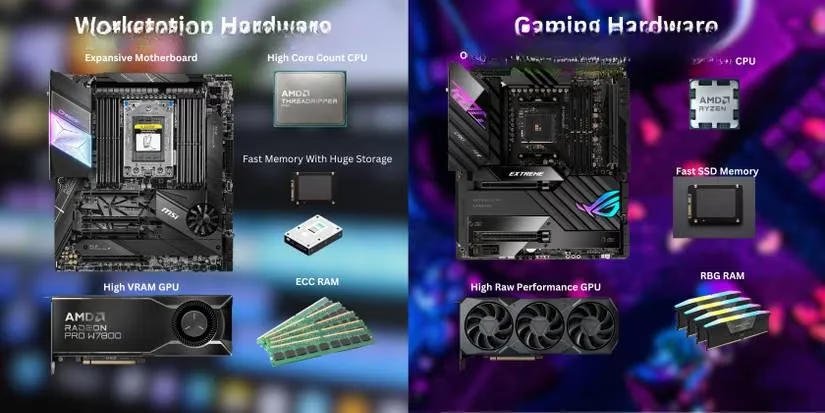
Workstation CPUs: These processors are all about parallel processing. Tasks like rendering a scene or simulating physics can be broken into hundreds of smaller tasks handled simultaneously. Therefore, workstation CPUs boast a very high core and thread count. In 2026, flagship models from lines like AMD Threadripper Pro and Intel Xeon W can feature 64, 96, or even 128 cores. It's a brute-force approach to computational workloads.
-
Gaming CPUs: Gaming, however, often relies on strong single-threaded performance. While modern games are better at using multiple cores, the speed of one or two cores is crucial for physics calculations and AI. CPUs like the AMD Ryzen 9 and Intel Core i9 series typically feature between 8 to 24 cores, but these cores are often faster individually (higher clock speeds) than their workstation counterparts. It's about precision speed over massive parallelism.
The Artist: GPU (Graphics Processing Unit)
This is arguably the most significant divergence.
-
Workstation GPUs (Professional Graphics): Models like NVIDIA RTX Ada Generation Workstation GPUs (successors to Quadro) and AMD Radeon Pro cards are engineered for accuracy and stability. They feature:
-
Massive VRAM (Video RAM): Often 24GB, 48GB, or more to hold immense textures, complex models, and massive datasets entirely in memory.
-
Error-Correcting Code (ECC) Memory: Prevents silent data corruption—critical when a single pixel error in a medical image or architectural blueprint could be catastrophic.
-
Certified Drivers: These are rigorously tested and validated with professional applications (like AutoCAD, SOLIDWORKS, Maya) to ensure perfect stability and compatibility. You're paying for flawless execution, not just frames per second.
-
-
Gaming GPUs (Consumer Graphics): Cards like the NVIDIA GeForce RTX 50 Series and AMD Radeon RX 8000 Series are built for raw throughput and speed. They prioritize:
-
High Frame Rates: Delivering the smoothest possible gameplay experience.
-
Real-Time Ray Tracing & AI Upscaling: Technologies like DLSS and FSR that create stunning visual effects efficiently.
-
Driver Optimization for Games: New game-ready drivers are released frequently to boost performance in the latest titles. Stability is important, but slight visual artifacts in a fast-paced game are less critical than in a final render.
-
The Foundation: Motherboard & Memory
-
Motherboards: Workstation motherboards (using sockets like sTR5 or LGA 4677) are built like industrial foundations. They offer extensive expandability: more PCIe lanes for multiple GPUs and add-in cards, more RAM slots (8 or more), and robust power delivery for those power-hungry, multi-core CPUs. Gaming motherboards focus on overclocking support, integrated RGB lighting controllers, and ultra-fast memory support for squeezing out every last drop of gaming performance.
-
RAM (System Memory): Workstations are memory hungry. It's common to see configurations starting at 64GB of DDR5 ECC RAM and scaling up to 512GB or even 1TB for handling massive simulations or 8K video projects. Gaming PCs, meanwhile, have found their sweet spot. In 2026, 32GB of high-speed DDR5 RAM is the standard for a high-end build, with 64GB being useful for heavy multitasking and content creation on the side.
The Personality: Design & Operating System
-
Aesthetic & Design: Ever seen a sleek, windowed case pulsating with RGB lights in a corporate server room? Probably not. Workstation cases are typically utilitarian, focused on optimal airflow, quiet operation (using high-quality fans), and easy access for upgrades. Gaming cases are showpieces, featuring tempered glass, intricate lighting, and sometimes custom liquid cooling loops—they are as much about the visual experience as the performance.
-
Operating System: Workstations often run Windows 11 Pro/Enterprise or specialized Linux distributions (like RHEL or Ubuntu Pro) for enhanced security, management features, and application support. Gaming PCs overwhelmingly run Windows 11 Home/Pro, optimized through features like DirectStorage for faster game loading, though SteamOS and other gaming-focused Linux distros have gained traction.
⚖️ The Million-Dollar Question: Can They Cross Over?
So, with all these differences laid out, can a gaming PC be a workstation, and vice versa?
The answer is a qualified yes, but with important caveats.
Using a Gaming PC for Professional Work: For many prosumers—serious hobbyists, freelance video editors, or indie developers—a high-end gaming PC is a fantastic and cost-effective all-in-one solution. It will handle Adobe Creative Suite, Blender projects, and programming environments with ease. However, if your livelihood depends on absolute accuracy, 24/7 stability, or working with datasets larger than 32GB, the lack of ECC memory, professional driver certifications, and potential for VRAM limitations in complex scenes could lead to crashes, corrupt files, and lost productivity.
Using a Workstation PC for Gaming: A modern workstation with a powerful professional GPU can certainly play games. But will it be the best experience? Often, no. The drivers are not optimized for gaming performance, and you are paying a significant premium for features (like ECC memory) that games simply don't utilize. It's like using a scientific laboratory oven to bake a pizza—it'll work, but it's overkill and not designed for the task.
🎯 Conclusion: Choosing Your Tool in 2026
In the end, the choice between a gaming PC and a workstation PC in 2026 isn't just about specs on a page; it's about aligning your tool with your primary objective.
| Feature | Workstation PC | Gaming PC |
|---|---|---|
| Primary Purpose | Professional Creation & Computation | Entertainment & Gaming |
| CPU Focus | High Core Count for Parallel Tasks | High Single-Thread Speed |
| GPU Focus | Accuracy, Stability, Large VRAM | Raw Speed, High Frame Rates |
| Key GPU Tech | ECC Memory, Certified Drivers | Real-Time Ray Tracing, AI Upscaling |
| RAM Typical | 64GB+ ECC DDR5 | 32GB High-Speed DDR5 |
| Design Ethos | Utilitarian, Quiet, Expandable | Aesthetic, Showcase, Themed |
| Ideal User | Engineer, Researcher, 3D Animator | Gamer, Streamer, Enthusiast |
Are you building a reliable partner for your professional craft, where time is money and error is not an option? Then the investment in a workstation's specialized architecture is justified. Or, are you building an immersive portal to digital worlds, where responsiveness and visual splendor reign supreme? Then a gaming PC is your champion.
The beautiful reality of 2026's PC market is that both categories are more powerful and capable than ever, offering users incredible flexibility. But understanding their core DNA—the why behind the what—ensures you pick the perfect engine for your journey.