
Let's be real, future-proof PCs sound like a dream, but often they're just code for 'the most expensive parts crammed into a box.' Been there, seen the price tags! 😅 But trust me, after years of building and upgrading, I know it's possible to craft a powerhouse that'll last you a good five years or more without selling your soul. It's not about maxing out your credit card; it's about smart, savvy choices. Think of it like building a relationship with your rig – invest wisely in the right areas, and it’ll stick with you through thick and thin.
🔋 RAM: DDR5 is Your Sweet Spot (For Now!)
Okay, let's talk memory. DDR5 is absolutely where it's at in 2025. DDR6? Yeah, whispers say it's coming next year (2026), but honestly, it'll take ages to become mainstream and affordable. I learned this lesson the hard way back in 2016. DDR4 was the new kid, DDR3 was everywhere and cheaper, but I splurged on DDR4. Best. Decision. Ever. Those Corsair sticks lasted me a solid six years!
DDR5 prices? They've done a beautiful nosedive since those crazy days in 2022 when a 32GB kit cost an arm and a leg (like $360!). Now? You can snag a solid 32GB kit for under a hundred bucks. 🤯 Seriously! And speed-wise, DDR5 is flying. Unless you're doing insane, specialized workloads, 32GB or even 64GB of DDR5 is going to feel super snappy long after DDR6 hits the shelves. Why stress about the very latest when the current gen is fantastic, affordable, and has years of life left?
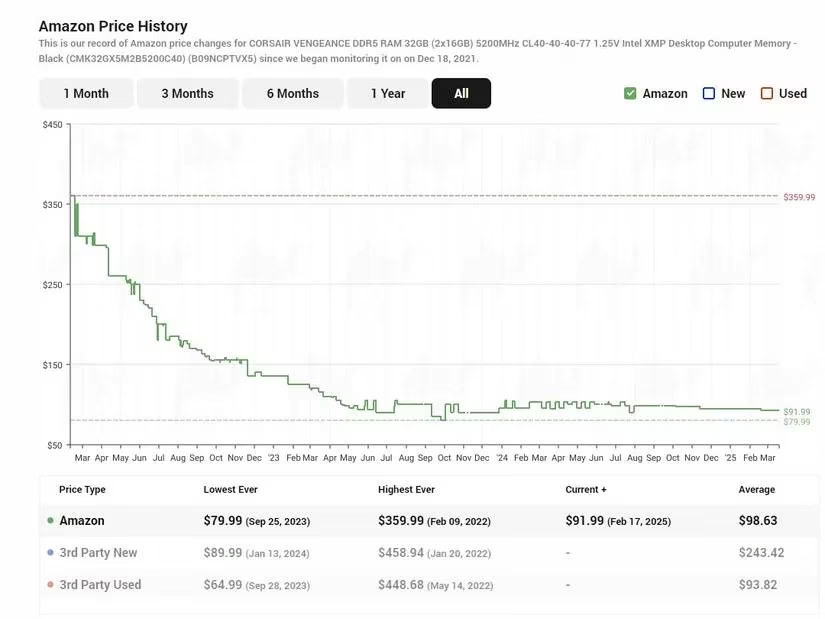 The glorious DDR5 price drop – a builder's dream come true!
💪 CPU & GPU: Go High-End (Previous Generation FTW!)
The heart and soul of your gaming or creative beast! The absolute latest GPU? Yeah, it's flashy, but your wallet will weep. My golden rule? Target the previous generation's high-end champions. When folks upgrade to the shiny new RTX 50-series or whatever's hot, they offload their perfectly capable RTX 40-series beasts – often at fantastic prices. I snagged a GTX 1080Ti and Ryzen 9 3900x back in 2020 for $400 each, right before prices went bonkers. That combo crushed it for years.
Don't fall into the 'mid-tier value' trap if you truly want longevity. A high-tier RTX 3080 Ti or RX 7900 XT, or a Ryzen 9 7900X/Intel Core i9 13900K used sensibly? That's the sweet spot. Look for reviews highlighting high-end value. Keep your eyes peeled on trusted marketplaces for used gems ideally around 70% of their original price or less. A top-tier GPU will handle games and heavy software until driver support fades, and a beefy CPU? They practically live forever if you treat 'em right. Seriously! Just keep that cooler clean and repaste every couple of years – overheating is their only real enemy.
| Component Type | Smart Buy (2025) | Why? |
|---|---|---|
| GPU | Previous Gen High-End (e.g., RTX 4080, RX 7900 XTX) | Massive power, significantly cheaper used, lasts years. |
| CPU | Previous Gen High-End (e.g., Ryzen 9 7950X, Core i9-13900K) | Raw processing power ages gracefully, less reliant on drivers. |
| Avoid | Brand New Flagship / Low-Mid Tier | Too expensive or lacks longevity power. |
🧩 Motherboard: Don't Skimp, Don't Overspend
So you've got a killer previous-gen CPU. Does it need the absolute fanciest, most expensive motherboard? Nah. But going bargain basement (like AMD A-series or Intel H-series) is asking for trouble. The mid-range B-series boards (like AMD's AM5 B650 or Intel's LGA 1700 B760) are usually the Goldilocks zone – just right. But here's the kicker: not all B-series boards are created equal. Two things are non-negotiable:
-
Robust VRMs (Voltage Regulator Modules) with Heatsinks: These little guys are the unsung heroes, delivering clean, stable power to your hungry CPU. If they're weak or uncovered, your CPU starves or cooks itself. 🔥 How many? Aim for at least 10 quality VRMs – look for those chunky blocks (chokes) around the CPU socket. They need big heatsinks!
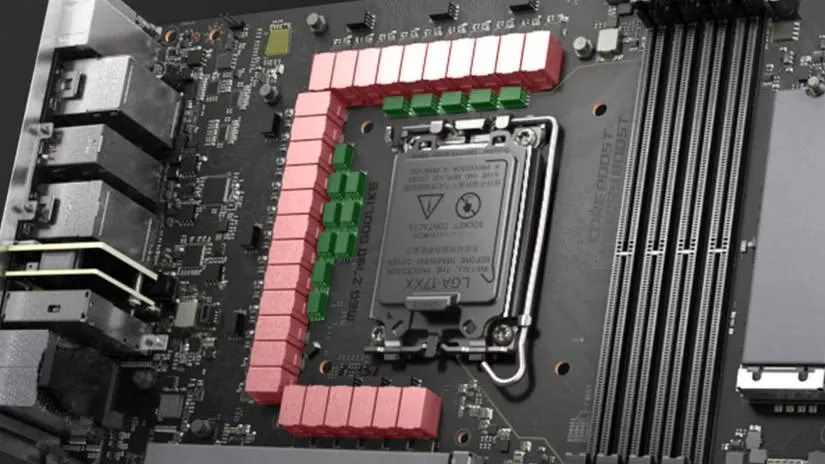 See those red blocks? Quality VRMs with heatsinks are CRUCIAL for power-hungry CPUs.
 -
RAM Flexibility: Stick with two RAM sticks! Two sticks run in efficient dual-channel mode. Filling all four slots doesn't make it faster, it just locks you in. Getting 2x16GB (like a solid Crucial kit) is way smarter than 4x8GB. You get the same performance now and leave two slots open for a cheap and easy future upgrade to 64GB. Future-you will thank past-you!
⚡ Power Supply (PSU): The Unsung Lifesaver
This one doesn't give you more frames, but oh boy, is it critical. A cheap, nasty PSU is a ticking time bomb. It can fry your precious components, cause instability, or worst-case – start a fire. My very first upgrade on my original build was ditching the cheap 500W Bronze unit for a quality SilverStone 600W Silver. That thing outlived multiple CPUs and GPUs! (Though, pro-tip: don't push a PSU past 5-7 years; efficiency and safety degrade).
Choosing right is key:
-
Use a Calculator: Plug your parts into the PC Power Supply Calculator.
-
Aim High: Don't just meet the minimum wattage. Get something comfortably above the recommendation, especially if you might upgrade.
-
Quality & Warranty: 80 PLUS Gold or Platinum efficiency is a good sign. Buy from reputable brands (Corsair, Seasonic, EVGA, be quiet!) with solid warranties (10 years is common now for good units). Seriously, research reviews – channels like PSUCircuit test them rigorously. This is not the place to save $20.
🔁 The Used Market: Your Secret Weapon (If You're Smart)
I get it, buying used can feel like walking a tightrope. But man, the savings can be insane! Most PC parts live a cushy life inside a case, just chilling on a desk. They aren't stressed like mining GPUs (which are rare now anyway). A high-end GPU or CPU from the previous generation isn't ancient; it's just smartly depreciated.
Minimize the risk:
-
Buy from Trusted Sources: Look for vendors with testing, guarantees, and good return policies.
-
Inspect & Maintain: Visually inspect parts if possible. Don't be afraid to repaste the GPU and CPU cooler – it's cheap insurance for lower temps and longevity.
-
Hunt Deals: Facebook groups, Marketplace, eBay – deals pop up constantly. Patience pays off!
Finding that perfect used component deal feels like striking gold!
Building a future-proof PC isn't magic. It's about making thoughtful, informed choices on the components that matter most for longevity: RAM generation, CPU/GPU tier, motherboard quality, and PSU reliability. Sprinkle in some savvy used-part hunting, and you've got a rig that won't just be powerful today, but will confidently stride into the next few years without begging for upgrades. It's about building smart, not just building expensive. Happy building! 🛠️✨