
I remember the first time death wore blue. Not the serene blue of a summer sky, but the electric, jarring azure that swallowed my screen whole, freezing my world mid-sentence, mid-thought. That sudden silence, louder than any fan whir or keyboard clatter. The Blue Screen of Death – BSoD, they call it clinically – isn't just an error; it’s a visceral interruption, a digital heart attack. It speaks of fragility, of the complex dance between silicon and code stumbling, leaving us stranded in a void of hexadecimal poetry and cold, hard reboots. Lost data whispers like ghosts in the machine, and the fear of deeper wounds – permanent scars etched onto hardware – lingers long after the system groans back to life. We’ve all been there, haven’t we? Staring into that abyss. 💀
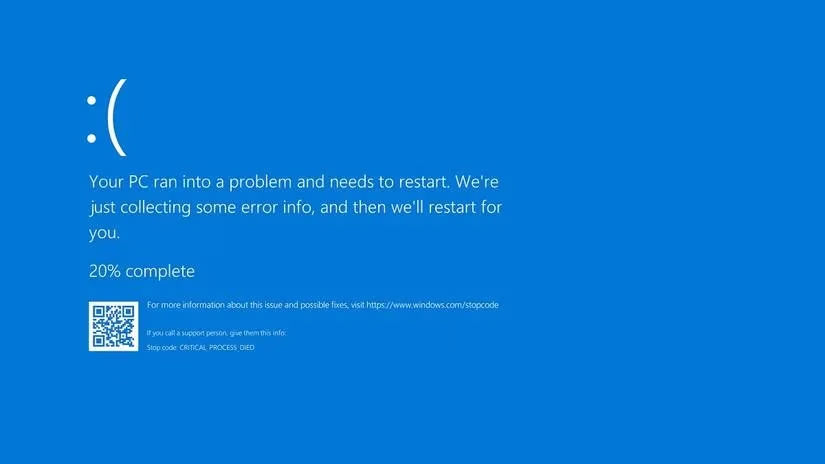
Over the years, I've learned their faces, these azure specters. Some visit more often than others, becoming grimly familiar companions in my computing journey. They leave cryptic calling cards – stop codes, alphanumeric runes scrawled across the blue void. When Windows reaches a precipice, a point where stumbling forward risks utter collapse, it chooses this controlled fall. A complete shutdown. A crash. It’s not malice, I tell myself, but a desperate act of preservation, a final gasp before potential chaos consumes everything. The system dumps its frantic last thoughts into memory files, a digital last will and testament waiting to be deciphered.

Identifying the specific phantom haunting your machine is the first, crucial step. That memory dump? It’s the Rosetta Stone. Without understanding its language, solutions are just shots in the dark. So many shades of blue... so many potential causes tangled like old wires. Faulty whispers from drivers, corrupted echoes of system files, the groaning protest of overheating hardware, or the silent decay of a component. The error code is the key. Once you grasp it, the path forward, though often winding, becomes visible. Here are the phantoms I've encountered most frequently, shadows cast by the blue light:
-
SYSTEM THREAD EXCEPTION NOT HANDLED: Ah, the driver debacle. This one feels like betrayal. Outdated, incompatible, or just plain faulty drivers – the essential translators between hardware and OS – throwing tantrums. The frustration? Often, it’s not one culprit, but a chorus of them, pointing fingers at each other. Finding the rogue voice requires patience, or a sharp Windows error lookup tool slicing through the noise. Updating, rolling back, sometimes purging and starting fresh. The Memory Diagnostic Tool often hums in the background during this hunt. 🔧
-
SYSTEM_SERVICE_EXCEPTION: A chameleon of crashes. GUI glitches flickering, drivers crumbling (a recurring theme!), or the insidious creep of corrupted system files gnawing at the foundations. Sometimes, the simplest act – banishing a recently installed, troublesome application – lifts the curse. Other times... a weary system reset feels like the only escape from the blue loop.
-
UNMOUNTABLE BOOT VOLUME: The name itself is a confession. Your computer wakes up, stretches, and then... can't find its own feet. The boot drive, the very root of its being, becomes inaccessible. This ghost only strikes at dawn, during the vulnerable boot sequence. Never mid-task. Solutions feel like resuscitation: repairing boot records, coaxing the volume back to life, or sometimes, a deep healing of the Windows installation itself. A system health check becomes paramount.
-
0xc00000e: Another boot-time specter, often pointing a bony finger at hardware miscommunication or, again, those corrupted system files preventing the OS from fully waking. HDD or SSD, it matters not. The fixes feel familiar: BIOS whispers reset (a soft sigh of default settings), the hopeful hum of Windows Automatic Repair, or rebuilding the Master Boot Record – the system's primal map. If the chill feels physical, a CMOS battery change might be the tiny spark needed.
-
MEMORY MANAGEMENT (0x0000001A): When the mind of the machine falters. This blue ghost manifests when Windows struggles to handle its own thoughts – the RAM. Faulty memory sticks whispering nonsense, drivers misdirecting the flow, rogue software jamming the pathways, hardware conflicts, or disk errors scattering fragments. The tools of order: CHKDSK sweeping the disk, SFC scanning for corrupted system whispers, updates smoothing the neural paths.
-
BAD SYSTEM CONFIG INFO (0x00000074): A surprisingly gentle phantom, this one. Widespread, yes, but often less malevolent. A hiccup in the system's configuration files. Sometimes... a mere restart, a soft reboot of reality, is enough to banish it. A reminder that not all blues are deep tragedies.
-
CRITICAL PROCESS DIED (0x000000EF): The sound of a vital thread snapping. A core background process, something essential humming beneath the surface, suddenly falls silent. The causes? A cacophony: driver failure, malware's poison, memory faults, even the suffocating dust settling on a forgotten component. The solutions range wide – from the simple incantation of a restart to the deeper ritual of a BIOS update, clearing the cobwebs from the machine's fundamental firmware.
-
nvlddmkm.sys: A specter tied to a name. NVIDIA users know this one – a specific cry from the graphics card's driver realm. The specificity is almost a relief. It narrows the hunt. Update Windows. Update the graphics drivers with fervor. Sometimes, a complete driver exorcism and reinstallation is needed. Gamers, I see you pushing for those extra frames... but consider the cost. Underclocking, a slight easing of the burden, can often prevent this blue specter from crashing the party at the worst moment. 🎮
-
WHEA_UNCORRECTABLE_ERROR: Hardware screaming under duress. Corruption, the searing touch of overheating, unstable voltage surges – or sometimes, the familiar ghosts of driver faults or corrupted registries. While the standard CHKDSK and driver checks apply, this phantom demands you feel the machine. Reseat components, ensure connections are true. Reset the BIOS, strip away any ambitious overclocks. Listen to the hardware's hum.
-
MACHINE CHECK EXCEPTION: The most elusive, the most frustrating phantom. It appears once, a fleeting, brutal blue flash, often vanishing without a trace, leaving no pattern, no reproducible path. Like a ghost that rattles the pipes just once. Its randomness mocks troubleshooting. We suspect hardware – a gremlin deep within the silicon. The solutions? A desperate prayer covering all bases: system scans, driver purges, hardware diagnostics, the gentle cleaning of dust tombs. You do everything, hoping it was just a fleeting nightmare, never to return.

These ten are the frequent visitors, the common blue ghosts haunting our modern Windows systems. Yet, they are merely a fraction – a mere ten whispers in a chorus of over five hundred possible stop codes. Each crash, each azure interruption, feels deeply personal. A violation of the digital space we inhabit. We curse, we sweat, we scour forums lit by the same blue glow. But beneath the frustration lies a strange intimacy. We learn the machine's language of failure, its points of fracture. We become amateur surgeons, probing the digital innards with diagnostic tools and driver updates. The solutions are rarely elegant, often involving brute-force restarts, hopeful updates, or the nuclear option of a reset. Yet, there is a perverse comfort in knowing that most blues, however terrifying in the moment, have a path back to light. The memory dump holds the clues, the error code the map.
But I wonder... as we build ever more complex systems, layer upon layer of abstraction, do these blue screens become our only raw connection to the machine's true, fragile state? A stark, unfiltered message from the depths? Is the BSoD, in its brutal honesty, the last human-readable scream of the silicon mind before it chooses oblivion over chaos? And in that fleeting blue moment, suspended between function and failure, what does it truly mean to understand the machine? The answers, like the causes of the elusive Machine Check Exception, remain tantalizingly out of reach, shimmering somewhere in the vast, uncharted blue.