
The silence is the first thing I notice. Not the quiet of an empty room, but the hollow, digital silence of a library that has forgotten its own stories. I open the Epic Games Launcher, that familiar gateway to countless worlds, only to be greeted by a blank expanse where my collection of adventures should be. It’s as if a phantom librarian has come in the night and spirited away my most prized possessions—my games. This digital amnesia, a glitch in the matrix of my leisure, is a disorienting experience for any player in 2026. But fear not, fellow traveler, for this is not an end, but merely a puzzle to be solved. From the simple incantations of a refresh to the deeper rituals of cache cleansing, the path to restoration is woven from patience and a few trusted techniques.
The First Whisper: A Simple Refresh
Before despair sets in, remember the simplest magic. Often, the launcher is merely napping, its syncing processes tangled like a ball of yarn after a cat's playful assault. The solution is as gentle as a morning breeze. I navigate to my Library and seek out the circular arrow, the Refresh icon. A single click is a whispered command to wake up, to look again, to remember.
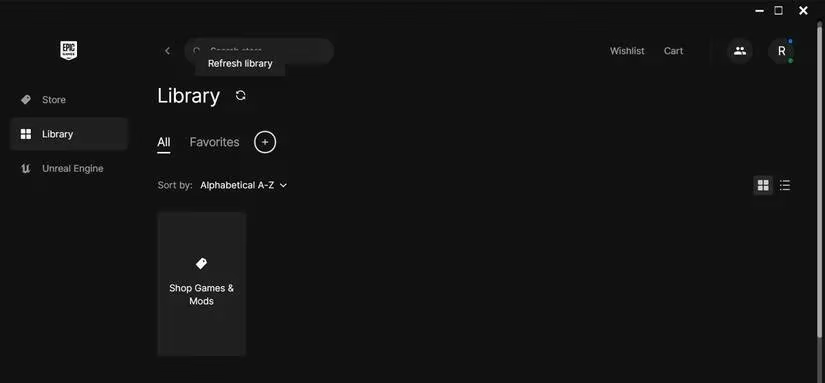
If the silent library persists, a more decisive restart is in order. I close the launcher completely, then summon the Task Manager with the arcane key combination Ctrl + Shift + Esc. There, in the Processes tab, I must ensure no ghostly remnant of Epic Games lingers. Ending these tasks is like clearing the static from a radio signal, allowing for a pure, new connection when the app is reborn from its desktop icon.
The Ritual of Re-authentication
Sometimes, the connection between my identity and my digital hoard grows faint. Logging out and back in is a ritual of reaffirmation. It forces the launcher to look me in the eye, verify my credentials, and re-establish the covenant that grants me access to my realms. This is also a moment to check: am I, in fact, myself? In shared spaces, another's account might have taken residence, showing only their purchased tales. Ensuring I am logged into the correct account is the first, fundamental step.
The Ephemeral Gifts and the Hidden Vault
The Epic Games Store, in its generosity, offers weekly tributes—free games. But some of these gifts are like fireflies in a jar, brilliant but temporary. A game with limited availability may fade from my library once its time is up. To solve this mystery, I must journey to the Store page itself and check the game's current status.
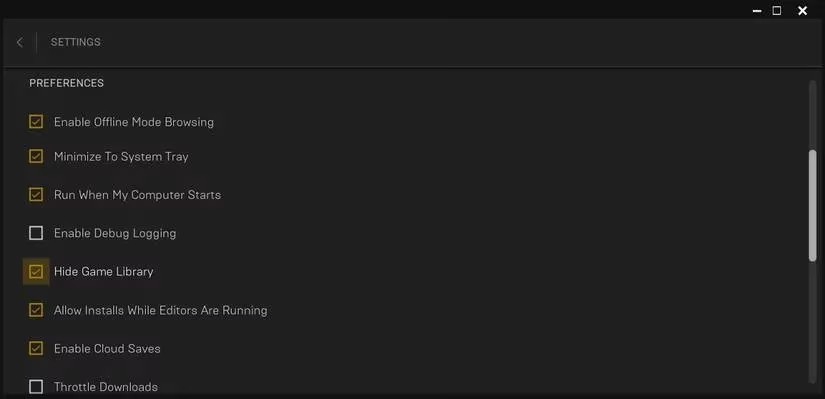
Conversely, the absence might be of my own making. The launcher allows me to hide my library, perhaps to shield younger eyes or protect a hard-won competitive rank. To unveil what I have concealed, I click my profile icon, venture into Settings, and under Preferences, I must ensure the "Hide Game Library" option is not checked. It’s like lifting a velvet cloth from a birdcage, revealing the songbird within.
Clearing the Filters and the Ancient Cache
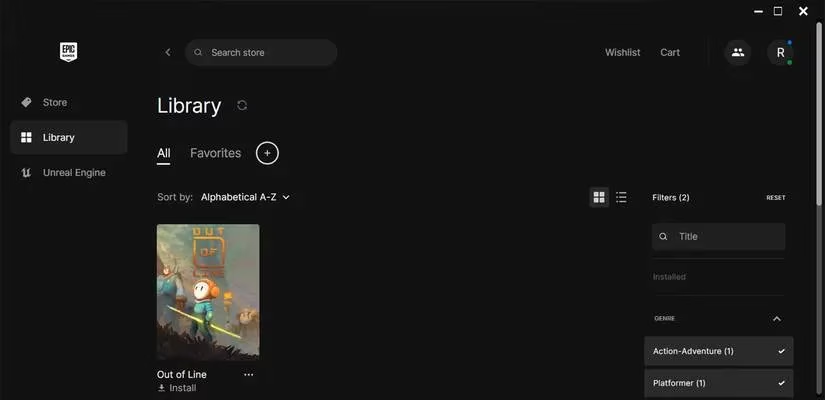
My own organizational zeal can sometimes be the culprit. The library's filters—by genre, platform, or feature—are powerful tools. But if left active, they act like a selective sieve, allowing only certain titles to be seen. I go to the Library tab, click on Filters, and uncheck all boxes or hit the Reset button. It’s the equivalent of wiping fog from a window, restoring the full view.
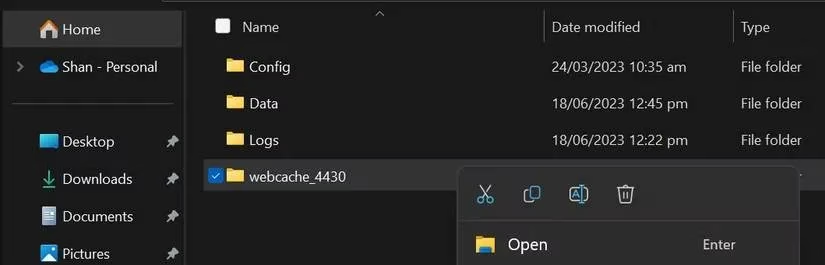
When problems are more profound, perhaps accompanied by launch errors, the issue may lie deeper, in the corrupted cache. This digital detritus can accumulate like silt in a riverbed, slowing and confusing the flow of data. On my Windows machine, I perform the cleansing:
-
Press
Windows key + Rto open the Run dialog. -
Type
%localappdata%and press Enter. -
Navigate through
Local > EpicGamesLauncher > Saved. -
Find the
webcachefolder and consign it to oblivion (delete it).
Relaunching the app after this purge often feels like giving it a new pair of eyes.
A Bridge Between Worlds
In 2026, our gaming identities are often spread across platforms. One elegant, long-term solution to library woes and a desire for unified progress is to link my Epic Games and Steam accounts. This creates a bridge between two continents of gaming, allowing achievements and saves to travel with me. While not a direct fix for a vanishing library, it fortifies my presence in the ecosystem, making such disruptions less likely to sever my connection to my games.
This journey from a blank screen back to a thriving library is a modern odyssey. It teaches patience and a methodical heart. Each step, from the gentle refresh to the surgical deletion of cache, is a stanza in a poem about reclaiming what is digitally yours. So when the silence falls, do not lament. Breathe, and begin the quiet work of remembrance. Your adventures await, merely hidden behind a veil of glitches, ready to be summoned back with the right words, the right clicks, and a steadfast spirit.